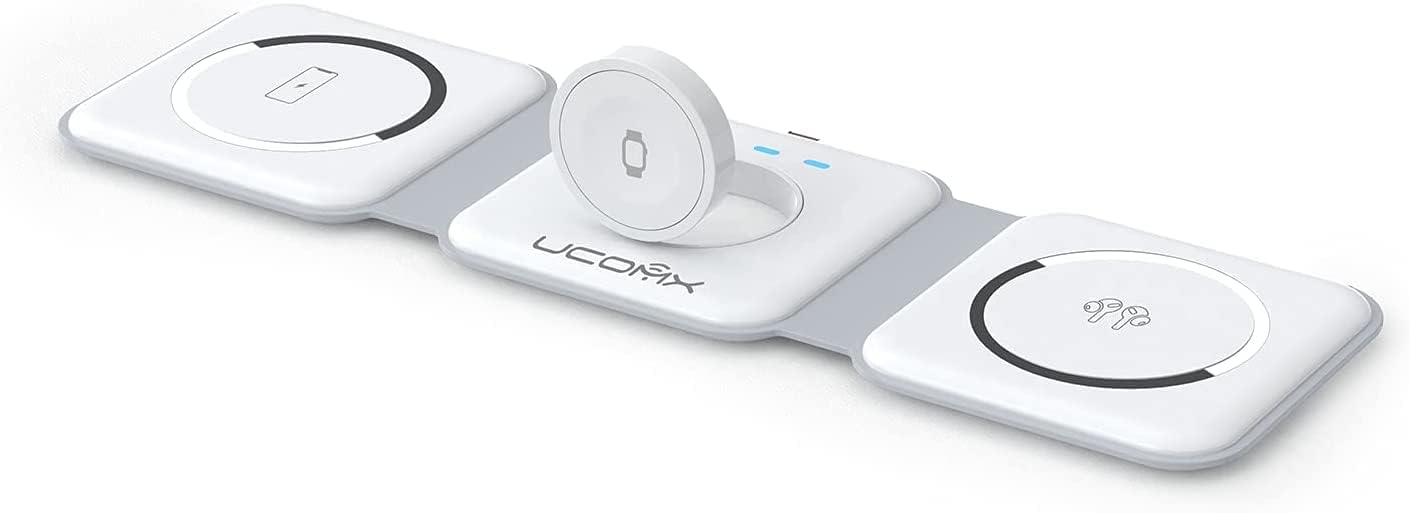
The UCOMX Nano 3-in-1 wireless charger is a foldable charging stand sold for an iPhone, Apple Watch and wireless-charging AirPods case. Its appeal is straightforward: one travel-friendly station can replace several bedside cables. The important question, however, is not whether a product page calls it “3-in-1.” It is whether the exact unit, power adapter, phone case and devices you own are compatible.
This is a specification and buying guide, not a claim of hands-on testing. UCOMX’s former product website is not currently a dependable source of documentation, while retailer listings for the Nano—often identified as model WC07-B—vary in the devices and accessories they name. Treat the printed label, packaging and manual supplied with your unit as the controlling specifications.

As an Amazon Associate, BlockTechBuzz earns from qualifying purchases.
UCOMX Nano 3-in-1 wireless charger at a glance
| Charging position | What it is designed for | What to verify |
|---|---|---|
| Magnetic phone pad | MagSafe-era iPhones and compatible magnetic cases | Exact iPhone, case alignment and whether the unit has a recognized Qi/Qi2 certification |
| Watch module | Apple Watch models listed by the seller | Model compatibility, charging speed and any MFi or Made for Apple Watch identification |
| Lower wireless pad | AirPods or another small Qi-enabled case | The case must support wireless charging and sit over the coil |
| Power input | One adapter and cable powering all positions | Required input rating and whether the adapter is actually included |
The folding frame is the main practical feature. It can lie relatively flat for packing, open as a phone stand, and hold a compatible iPhone in portrait or landscape orientation. That makes it useful on a nightstand, desk or hotel table. A compact frame does not by itself guarantee fast charging, though. Charging power depends on the station’s electronics, the input adapter, device limits, temperature and alignment.
Compatibility: check each device separately
iPhone and phone cases
Apple introduced its MagSafe charging system with the iPhone 12 family. A magnetic stand is therefore most straightforward with a MagSafe-compatible iPhone or case. Some older Qi-capable phones may charge on a flat wireless surface, but they do not contain Apple’s MagSafe magnet array and may not attach securely to an upright pad. Do not assume that magnetic attachment means the charger is Apple-certified or Qi2-certified.
Case construction matters more than a generic thickness claim. A thin non-magnetic case can weaken alignment; a case with a compatible magnetic ring may work better even if it is slightly thicker. Metal plates, wallet attachments, cards, ring grips and thick decorative layers can prevent charging or create heat. Apple specifically advises removing objects between an iPhone and charger. If the phone repeatedly connects and disconnects, test it without the case before blaming the power supply.
Apple Watch
The watch position should be assessed independently from the phone pad. Apple Watch uses its own magnetic charging implementation. A station can charge a watch without supporting the fastest rate available to newer models. Apple says fast charging requires compatible hardware and an appropriate USB-C power adapter, and charge time also varies with temperature, settings and battery condition. If fast charging is important, look for explicit support for your exact Watch model rather than a broad “all Apple Watch” statement.
AirPods and other earbuds
AirPods compatibility depends on the charging case, not simply the earbuds. Apple has sold cases that charge by cable, Qi, MagSafe and—in some generations—an Apple Watch charger. For the Nano’s lower pad, the case needs compatible wireless charging and its receiving coil must align with the pad. A status light may illuminate briefly and then turn off even while charging, so confirm progress on the connected iPhone or after several minutes.

MagSafe, Qi and Qi2 are not interchangeable labels
Wireless charging product language can be confusing. Qi is the Wireless Power Consortium’s interoperable charging standard. Qi2 introduced a Magnetic Power Profile based on precise alignment, and later revisions increased supported power. MagSafe is Apple’s system and product program. A charger may use magnets in a MagSafe-like arrangement without being a certified MagSafe or Qi2 product.
Certification is tied to an exact product, not a brand name or visual resemblance. Before buying, check the packaging for a model number and search that model in the Wireless Power Consortium product database. For Apple Watch accessories, Apple also provides a database for MFi-licensed accessories. If the model cannot be found, describe it only as a compatible magnetic or wireless charger; do not infer certification from the seller’s title.
Apple’s current MagSafe support documents quote up to 25 watts only for specific recent iPhones, chargers and power adapters. That headline rate should not be applied to this older third-party station. The Nano’s actual phone output may be lower, especially when three devices charge together. A phone’s on-screen animation confirms a connection, not a particular wattage.
Power adapter and simultaneous charging
Retail listings for the Nano have advertised an included adapter, but bundles can change. Confirm the box contents before purchase. If replacing the adapter, match the input requirements printed on the station or in its manual. A connector that physically fits is not proof that an adapter provides the voltage, current or USB Power Delivery profile the station expects.
- Use the supplied cable and adapter for the first setup.
- Connect the station directly to a wall outlet rather than an unpowered hub.
- Test one charging position at a time, then add the other devices.
- Check each device after 10–15 minutes to confirm that its battery level is rising.
- If charging stops under load, try the documented adapter and inspect the cable for damage.
Three-device charging can divide the station’s available input power and produce more heat than charging one item. That is normal within limits, but a device or station that becomes unusually hot, smells odd, discolors or repeatedly shuts down should be disconnected. Let it cool on a hard, ventilated surface and contact the seller rather than continuing to use it.
What charging speed means in daily use
Maximum output is only one part of the experience. A stable overnight charge at a moderate rate may be more useful than a high peak that quickly falls as the phone warms. Battery-management software also changes power throughout a session: a device may draw more when its battery is low, slow as it approaches full, or pause near a user-defined charge limit. Measuring only the first few minutes can therefore produce a misleading comparison.
If speed matters, record the starting percentage, remove unnecessary background load, use the same adapter and check the result after a fixed interval. Compare one device alone with all three positions occupied. This will not replace laboratory power testing, but it can reveal whether the station meets your routine. Do not use an app’s estimated time as proof of the charger’s wattage; a USB power meter on the input also shows total station consumption, not the exact power delivered wirelessly to each battery.
Setup for reliable charging
- Open the stand on a stable surface. Keep the hinges fully seated so the phone does not pull the base over.
- Connect the specified power source. Avoid loose adapters, damaged cables and travel converters that do not support the required input.
- Center the phone. The magnetic ring should snap into alignment without forcing it.
- Place the watch flat on its module. Confirm the charging symbol appears and remains present.
- Center the earbud case on the lower pad. Move it slightly if the charge does not begin.
- Remove obstructions. Take out cards, keys, coins and metal accessories from the charging area.
Wireless charging naturally produces some heat, and phones may temporarily slow or pause charging to protect the battery. Keep the station out of direct sun and do not cover it with bedding or clothing. For broader advice on heat, charge limits and battery aging, see our guide to improving smartphone battery life.
Troubleshooting common problems
| Problem | Likely checks |
|---|---|
| Phone will not attach | Confirm a MagSafe-capable phone or magnetic case; remove thick or metal accessories. |
| Phone attaches but does not charge | Reconnect power, center the ring, remove the case and test the documented adapter. |
| Watch connects intermittently | Clean and dry both surfaces, reseat the watch and confirm exact model support. |
| AirPods case does not charge | Verify that the case supports wireless charging and reposition its coil over the pad. |
| All devices charge slowly | Check adapter capacity, cable condition, temperature and whether three outputs share power. |
| Station gets excessively hot | Disconnect it, remove foreign objects, allow cooling and stop use if the behavior repeats. |
Who should consider it?
The Nano makes the most sense for someone already using the Apple trio it was designed around and who values a folding stand more than maximum charging speed. It can reduce cable clutter and simplify packing. It is less suitable for a mixed Android-and-Apple household, anyone who needs independently replaceable charging modules, or users who require verified fast charging for every device.
- Good fit: a MagSafe-era iPhone, wirelessly charging AirPods case and supported Apple Watch.
- Check carefully: older iPhones, non-magnetic cases, unusually large camera bumps and newer Apple Watch fast-charge expectations.
- Look elsewhere: if the exact model lacks the certification, power information or warranty support you require.
A compact charging product is still an electrical accessory, so documentation and traceable certification matter more than slogans. The same principle applies to other desktop gadgets: our JZENT Tesla coil safety and buying guide explains why exact model information should come before novelty claims.
Care, travel and long-term use
Fold the stand only along its intended hinges and avoid carrying it by the raised phone pad. Before packing, disconnect the cable and inspect the hinge, plug and strain relief. Keep grit away from charging surfaces so it does not scratch a phone or case. Clean with a dry, soft cloth; liquid cleaners can enter seams and leave conductive residue.
For international travel, check the adapter’s printed input range rather than assuming it accepts every mains voltage. A simple plug adapter changes the pin shape but does not convert voltage. In a hotel, place the station where a vibrating phone cannot fall, and keep the original cable in your bag as a backup. If the unit develops a loose hinge or exposed wire, retire it rather than taping over a mechanical or electrical fault.
Frequently asked questions
Does the UCOMX Nano fast-charge every iPhone?
No universal fast-charge rate should be assumed. Output varies with the Nano model, adapter, iPhone, temperature and concurrent devices. Check the station’s label and manual rather than applying Apple’s maximum MagSafe figures to a third-party charger.
Can it charge through a case?
Often, but case design is decisive. A compatible magnetic case usually aligns better than a generic case. Remove wallets, cards, metal plates and thick attachments. If charging is unstable, test the bare phone.
Is it Qi2-certified?
Do not assume so from the magnetic design. Qi2 launched after many chargers of this style reached the market. Confirm the exact model in the Wireless Power Consortium database and on its packaging.
Can it replace all three original chargers?
It may handle everyday overnight charging, but keeping an original cable is sensible for troubleshooting, software recovery, travel backup and occasions when a device needs its fastest supported charge.
Bottom line
The UCOMX Nano 3-in-1 wireless charger is best judged as a compact organizer, not as a promise of maximum speed. Verify the exact model, box contents, certifications and compatibility with all three devices. With a suitable case and power adapter, its foldable design can be convenient; without those checks, “3-in-1” can quickly become one reliable charging position and two sources of frustration.
Leave a Reply