
Augmented reality and virtual reality are no longer a single futuristic idea. They are a collection of technologies moving at different speeds: phone-based AR is already common, virtual reality has an established gaming audience, mixed-reality headsets can place digital objects in a view of the physical room, and lightweight smart glasses are developing along a separate path.
The most important changes are not about a vague “metaverse.” They involve better passthrough cameras, more natural input, AI-assisted scene understanding, portable software standards, and practical uses in training, design, entertainment, and healthcare. This guide explains the major AR and VR trends, separates proven capabilities from marketing claims, and highlights the limits that still matter.
AR, VR, MR, and XR: What Do the Terms Mean?
The terminology can become confusing because companies use overlapping labels. A simple way to separate the categories is to look at how much of the physical world remains visible.
- Augmented reality (AR) adds digital information to a view of the real world. A phone showing furniture in a room is a familiar example.
- Virtual reality (VR) replaces the user’s surroundings with a computer-generated environment, usually through an opaque headset.
- Mixed reality (MR) blends physical surroundings and spatially anchored digital content so that virtual objects can appear to occupy the room.
- Extended reality (XR) is the umbrella term covering AR, VR, and MR.
The boundaries are increasingly fluid. One headset may show ordinary windows, place a three-dimensional model on a desk, and then switch into a fully immersive environment. Apple’s visionOS documentation, for example, describes experiences that move among windows, 3D volumes, and immersive spaces. That flexibility—not the label on the box—is the more meaningful trend.
1. Mixed Reality Is Becoming a Standard Headset Feature
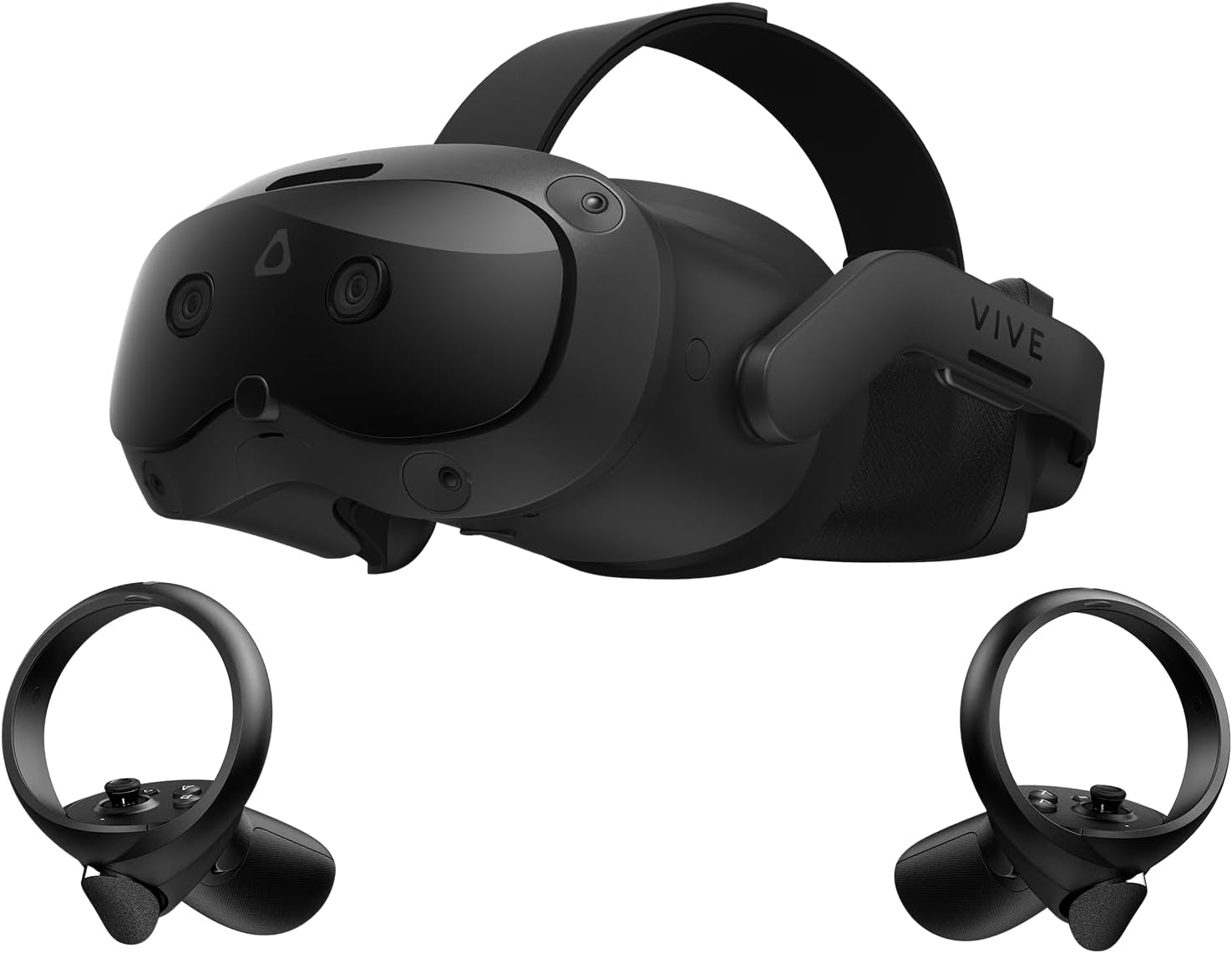
Earlier consumer VR systems were designed mainly to block out the room. Newer headsets increasingly use outward-facing cameras to provide a live view of the user’s surroundings. This “passthrough” view lets applications place menus, screens, games, and 3D objects within the physical space.
Mixed reality can make a headset easier to use because people can see a keyboard, locate a controller, or speak to someone nearby without removing the device. It also enables room-scale experiences that use walls, furniture, and open floor area as part of the application.
Passthrough is not the same as looking through clear glass. Camera quality, processing delay, depth accuracy, lighting, and field of view all affect how natural the result feels. Small text on a real monitor may still be difficult to read, and fast motion can expose visual artifacts. Buyers should judge mixed reality by hands-on comfort and image quality, not by the presence of a color camera alone.
2. Spatial Interfaces Are Moving Beyond Flat App Windows
XR gives software a larger canvas than a phone or monitor. Applications can remain familiar windows, become three-dimensional objects, or surround the user completely. Designers are learning when each format is genuinely useful.
- Windows work well for familiar tasks such as browsing, messaging, and video.
- Volumes are useful for objects that benefit from being examined from multiple angles, including product models and scientific visualizations.
- Immersive spaces suit games, simulations, guided training, and media designed to occupy the user’s full attention.
The best spatial applications do not turn every menu into a floating 3D object. They use depth only when depth adds information or improves interaction. Clear text, predictable controls, and an easy way to return to the physical environment remain essential.
3. Eye, Hand, Controller, and Voice Input Are Converging
Controllers remain valuable for gaming because physical buttons provide speed and tactile feedback. Hand tracking is convenient for menus and direct manipulation, while eye tracking can help select a target or support performance techniques such as foveated rendering. Voice can be useful for search and text entry when privacy and noise allow it.
No single input method is best for every task. Hand tracking can lose accuracy when hands overlap or leave the cameras’ view. Eye tracking requires careful calibration and raises sensitive-data questions. Voice is not always appropriate in shared spaces. The practical direction is multimodal input: systems combine several signals and let users switch between them.
4. AI Is Improving Scene Understanding, Not Just Adding Chatbots
Artificial intelligence can make XR systems more aware of what their cameras and sensors detect. Computer-vision models can identify surfaces, estimate depth, recognize objects, separate a person from the background, and help anchor digital content in the correct place.
Generative AI can also assist creators by producing concept art, textures, dialogue, code, or early 3D assets. These tools may speed up prototyping, but their output still needs review for accuracy, licensing, visual quality, and performance. A generated object that looks convincing on a laptop can contain inefficient geometry or behave poorly when viewed from every angle in a headset.
For readers interested in the wider technology landscape, our guide to the top technology trends explains how AI, connectivity, cybersecurity, and other fields overlap with XR.
5. Smart Glasses and Display Glasses Are Following Different Paths
“AR glasses” can describe very different products. Some smart glasses include cameras, microphones, speakers, and an AI assistant but no display. Some display glasses act like a wearable monitor for a phone, computer, or game console. More advanced AR devices attempt to place interactive graphics within the wearer’s view of the world.
These categories involve different compromises. Lightweight glasses have limited room for batteries, processors, cameras, and heat management. A wider field of view and brighter display generally require more power or bulk. Prescription support, fit, privacy indicators, and outdoor visibility also matter.
That distinction is important when shopping. A pair of video glasses can be excellent for private media viewing without mapping a room or placing persistent holograms in it. Our VITURE Pro 2 XR glasses review looks at that wearable-display category in more detail.
6. Gaming Remains XR’s Most Mature Consumer Use
Gaming gives VR a clear reason to exist: head tracking, motion controls, spatial audio, and stereoscopic depth can change how a player aims, explores, and interacts. Standalone headsets have reduced setup friction, while PC-connected systems can offer higher visual complexity when paired with capable hardware.
The strongest experiences are designed around comfort. Teleport movement, snap turning, seated modes, adjustable vignettes, dominant-hand options, and multiple difficulty settings allow more people to play. Mixed-reality games add another format by turning a room into part of the level.
VR is one chapter in a much longer story of changing interfaces. See our history of gaming and consoles for context on how new controls and display technologies have repeatedly shaped game design.
7. Training and Design Often Have a Clearer Business Case Than Virtual Offices
XR is especially useful when the real task is expensive, dangerous, rare, or difficult to reproduce. A simulation can let a worker rehearse a maintenance procedure, learn the layout of equipment, or repeat an emergency scenario without interrupting a production line. Engineers and designers can review a full-scale model before a physical prototype exists.
That does not mean every meeting should move into VR. Video calls are faster for many conversations, and prolonged headset use can create fatigue. Immersive collaboration makes more sense when participants need to inspect a shared 3D object, practice a spatial procedure, or understand scale.
8. Medical XR Is Real, but Claims Require Evidence
AR and VR are used in medical devices and research for purposes that include surgical planning, rehabilitation, diagnostic support, pain management, and behavioral health. The U.S. Food and Drug Administration maintains information on medical devices that incorporate AR or VR, which confirms that the field extends beyond demonstrations and consumer wellness apps.
However, “uses VR” does not prove that a treatment is safe or effective for every condition. Medical products should be evaluated for their intended use, evidence, regulatory status, contraindications, and professional oversight. A general meditation experience and a regulated therapeutic device are not interchangeable.
9. AR Shopping Works Best When It Solves a Specific Question
Consumer AR is often most useful on devices people already own. A phone can preview furniture at approximate scale, show how a color looks on a wall, place a product model on a table, or provide navigation cues. Face and body tracking can support virtual try-ons for cosmetics, eyewear, and some clothing.
Accuracy varies. Lighting, camera calibration, body tracking, material rendering, and the quality of the 3D model can all affect the result. AR can narrow choices, but it should not be treated as a perfect measurement or color reference. The best retail experiences answer one practical question quickly instead of forcing shoppers into a complicated virtual store.
10. Open Standards Are Making XR Software More Portable
Fragmentation has long been a problem for XR developers. Different headsets may use different controllers, tracking systems, and platform services. The Khronos Group’s OpenXR standard provides a common API for AR and VR devices. It does not make every headset identical, but it can reduce the amount of platform-specific work needed to support multiple systems.
Platform competition continues. Apple provides visionOS tools for spatial applications, while Google introduced Android XR as a platform for headsets and, eventually, glasses. For developers, a larger question is whether content, identity, assets, and interaction patterns can move between ecosystems without being rebuilt from scratch.
11. Comfort, Accessibility, and Privacy Are Core Product Features
Display resolution gets attention, but a technically impressive headset can still fail if it is uncomfortable. Weight distribution, heat, facial pressure, lens adjustment, battery placement, prescription options, and motion-to-photon latency influence whether people want to keep wearing a device.
Accessibility must be designed in from the start. Useful options include seated play, one-handed input, remappable controls, captions, audio descriptions, high-contrast interfaces, reduced motion, and alternatives to gaze or gesture controls. Physical-space requirements should be stated clearly.
XR devices can collect unusually sensitive information. Cameras may observe a home or workplace; microphones capture sound; eye tracking can reveal where attention is directed; and spatial maps can describe a room. Users and organizations should check what data stays on the device, what is uploaded, how long it is retained, and whether recordings or maps can be deleted.
What Is Established, and What Is Still Emerging?
| Area | Established today | Still developing |
|---|---|---|
| Consumer entertainment | VR games, fitness apps, 360-degree and immersive media | Broad mixed-reality content libraries and longer all-day use |
| Work | Training simulations, design review, remote expert guidance | Routine replacement of laptops and video meetings |
| Shopping | Phone-based product previews and selected try-ons | Consistent fit, color, and material accuracy across products |
| Healthcare | Specific regulated devices and supervised clinical uses | Evidence for many broad wellness and treatment claims |
| Wearables | Audio/camera smart glasses and wearable display glasses | Lightweight, all-day glasses with wide-field interactive AR |
| Development | Major platform toolkits and OpenXR support | Seamless portability of apps, assets, and accounts |
What to Check Before Buying an XR Device
- Primary use: Choose for a specific activity—gaming, media, exercise, development, training, or portable displays—not for a generic promise about the future.
- Content compatibility: Confirm that the games or applications you want exist on the device and in your region.
- Comfort and fit: Try the headset if possible. Check weight balance, glasses clearance, lens range, and replacement strap options.
- Space and safety: Measure the available play area and understand whether the product supports seated or stationary use.
- Computer or phone requirements: Some products work independently; others need a compatible source device, cable, adapter, or high-performance PC.
- Privacy controls: Review permissions for cameras, microphones, eye tracking, hand tracking, and room mapping.
- Total cost: Include controllers, prescription inserts, head straps, cases, batteries, software, and any subscriptions.
The Bottom Line
AR and VR are progressing through practical improvements rather than one sudden leap into a universal virtual world. Mixed-reality passthrough is broadening what headsets can do. Spatial interfaces are giving designers more choices than a flat screen. AI is improving perception and creation tools. Open standards are reducing some development friction.
At the same time, familiar constraints remain: comfort, battery life, cost, content, privacy, accessibility, and the simple question of whether XR is better than a phone or monitor for the task. The most credible products and applications are the ones that solve a defined problem and explain their tradeoffs clearly.
Leave a Reply