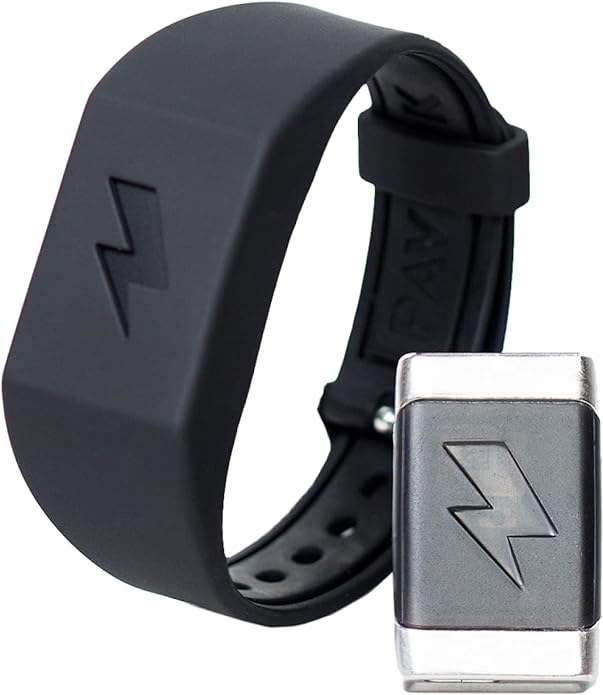
This Shock Clock 2 review examines what Pavlok’s wearable alarm actually does, how its vibration, sound, and optional electrical stimulus work, what the app and stop modes require, and which safety limitations matter. It is a specialized wake-up tool for adults who routinely dismiss ordinary alarms—not a treatment for sleep disorders or a guaranteed route to better sleep.

Shock Clock 2 review: what the device is
Shock Clock 2 is a wrist-worn alarm made by Pavlok. The wearer programs alarms through the Pavlok mobile app and chooses vibration, an audible beep, an adjustable electrical stimulus that Pavlok calls a “zap,” or a combination of the three. The alarm is stored on the wearable after it is saved, so the phone does not need to remain connected by Bluetooth overnight.
The product’s purpose is narrower than the old article suggested. It can make an alarm harder to ignore and can require a physical action before the alarm stops. It cannot create enough sleep, diagnose why someone is difficult to wake, or correct a schedule that consistently allows too little rest.
| Wake stimuli | Vibration, beep, optional electrical stimulus, or combinations |
|---|---|
| Programming | Pavlok app for iOS or Android; alarms are saved to the device |
| Stop options | Normal button/app controls, or configurable tasks such as jumping jacks or scanning a QR/UPC code |
| Charging | Micro-USB on Shock Clock 2 |
| Water exposure | Pavlok’s current support material says Shock Clock 2 is not waterproof or water resistant |
| Included items | Module, wristband, and charging cable according to Pavlok |
| Intended user | Adults; manufacturer safety exclusions apply |
How the alarm sequence works
Pavlok recommends beginning with vibration or sound and using the electrical stimulus only if the earlier cue does not wake the wearer. That staged approach is more accurate than saying the watch immediately shocks everyone awake. The exact sequence, stimulus levels, days, and alarm time are chosen in the app and saved to the wearable.
- Charge and pair: charge the module, install the Pavlok app, create the required account, and pair the wearable.
- Test each cue while awake: begin at a low level and confirm that vibration, sound, and the optional stimulus work as expected.
- Create the alarm: choose the time, repeat days, stimuli, and intensity, then save it to the device.
- Confirm the save: Pavlok’s instructions describe device feedback when an alarm is successfully stored. Check the upcoming alarm in the app.
- Wear it correctly: the contacts need suitable skin contact without making the band uncomfortably tight.
A normal alarm can be snoozed or disabled using the device controls or app. Snooze Lock is intended to add friction: depending on the configured stop mode, the wearer may need to complete jumping jacks or scan a code placed away from the bed. These tasks can be more important than the electrical cue because they require the person to move or leave the bedroom.
What the “zap” is—and is not
The stimulus closes a circuit through the skin at the contact points. Pavlok describes it as adjustable and designed to attract attention rather than cause injury. That is a manufacturer claim, not independent medical proof that the device is appropriate for every person. Sensation varies with intensity, contact, skin condition, placement, and individual sensitivity.
The original article called the approach “negative reinforcement.” In behavioral terminology, adding an unpleasant stimulus after a behavior is closer to positive punishment; negative reinforcement removes an unpleasant stimulus when a desired behavior occurs. More importantly, a marketing explanation about conditioning does not establish that every wearer will develop a reliable response or stop needing the device.
Safety and suitability
Pavlok says the device is for adults and should not be used by children, pets, people who may be pregnant, people with certain heart conditions, people with an implanted medical device such as a pacemaker, or anyone with a condition that could be affected by mild electrical stimulation. Anyone with a relevant medical concern should ask a qualified clinician before use.
- Do not use the stimulus when a startle could cause injury, such as while driving, handling dangerous equipment, climbing, or performing precision work.
- Do not use Shock Clock 2 in the shower, bath, or other wet environment. Current Pavlok support documentation says this generation is not water resistant.
- Inspect the band, contacts, charging port, and skin. Stop if there is damage, persistent irritation, unusual pain, or another concerning reaction.
- Do not set an extreme jumping-jack requirement. Pavlok recommends a modest number and warns against overexertion.
- Test a backup alarm until the device, charging routine, and saved schedule have proved reliable.
A wake-up device does not replace healthy sleep
Adults ages 18–60 generally need at least seven hours of sleep, according to the CDC, while individual needs and recommendations change with age. Repeatedly sleeping through alarms can reflect simple sleep deprivation, but it can also accompany irregular schedules, medication effects, alcohol use, sleep apnea, narcolepsy, or other conditions. A stronger alarm addresses the moment of waking; it does not address the cause.
Seek medical advice if difficulty waking is persistent, if daytime sleepiness affects driving or work, or if there is loud snoring, gasping, breathing pauses, frequent awakenings, or unrefreshing sleep despite enough time in bed. A wearable alarm should never be used to make chronic sleep restriction seem sustainable.
A practical routine still matters: use a consistent schedule, allow enough sleep opportunity, reduce late-night disruption, and charge the wearable before it becomes unreliable. BlockTechBuzz’s digital-detox guide covers ways to reduce disruptive technology habits, while the battery-life guide explains charging and heat practices for everyday devices.
Setup checklist for a safer first week
- Read the current manufacturer instructions and safety exclusions.
- Update the app and device firmware before relying on the alarm.
- Pair and save a test alarm during the day.
- Start with vibration or beep and the lowest practical intensity.
- Place a QR code in a safe, well-lit location if using that stop mode.
- Keep the route free of trip hazards and do not require exercise that is unsafe for the wearer.
- Use a second alarm during the trial period.
- Confirm alarms after time-zone changes, app reinstallations, a fully depleted battery, or device resets.
App, privacy, and reliability considerations
The app is part of setup and configuration, so prospective buyers should confirm current phone compatibility and review permissions, account requirements, and the vendor’s privacy terms. The wearable stores saved alarms locally, which reduces overnight dependence on the phone connection, but app access may still be needed to change schedules or advanced settings.
Like any rechargeable wearable, the alarm can fail because it was not charged, an alarm was saved for the wrong day, the band was removed, or the configuration changed. Important travel, medication, caregiving, and work obligations deserve redundancy. An ordinary clock across the room may be a better backup than another phone notification.
Who may benefit—and who should skip it
Shock Clock 2 may suit an adult who routinely snoozes ordinary alarms, wants a silent vibration option for a shared room, and is comfortable with an app-connected wearable. The QR-code and movement stop modes can also help someone who needs a deliberate action before the alarm ends.
It is a poor fit for anyone covered by the manufacturer’s medical exclusions, anyone uncomfortable with electrical stimulation, a person who cannot safely perform the configured stop task, or someone who primarily needs evaluation for inadequate or disordered sleep. Buyers wanting voice control, music, and smart-home routines instead may prefer a bedside device; see the Amazon Echo Spot buying guide for that different approach.
Alternatives to consider first
Different alarm failures call for different solutions. If sound is the problem in a shared room, a vibration-only watch or bed-shaker alarm may provide a less intrusive cue. If the user dismisses an alarm without becoming alert, placing a conventional alarm across the room or using a QR-code alarm on an existing phone may add enough movement without an electrical stimulus. A sunrise-style light may suit someone whose schedule and room allow a gradual cue, although it is not a substitute for treatment of a circadian or sleep disorder.
People with hearing loss, limited mobility, visual impairment, seizure risk, balance problems, or another disability should evaluate whether the alarm cue and stop task are accessible and safe. A jumping-jack requirement is not universally appropriate, and a QR code placed downstairs or in a dark room can create a fall risk. The best alarm is one that the particular user can perceive and stop safely.
Care and troubleshooting
Keep the contacts and band clean according to Pavlok’s instructions, but protect the module from water. Sweat, skin products, debris, a loose fit, or a worn band can change contact and comfort. Do not charge a wet, damaged, unusually hot, or swollen device. If battery life declines sharply, pairing repeatedly fails, or the module shows physical damage, stop relying on it as the only alarm and contact the manufacturer or seller.
When an alarm does not fire, check the device charge, saved days, time zone, alarm toggle, stimulus levels, and whether the schedule was stored on the correct Pavlok device. Pavlok notes that a fully depleted Shock Clock 2 may need to pair again to resynchronize its time zone. After travel, daylight-saving changes, an app reinstall, or a reset, run a daytime test instead of discovering the problem the next morning.
Buying checks
- Confirm the listing is specifically for Shock Clock 2, not Pavlok 2, Shock Clock 3, or Shock Clock MAX.
- Check that the module, band, and correct Micro-USB cable are included.
- Review phone compatibility, return policy, warranty, and whether third-party purchases qualify for Pavlok’s direct guarantee.
- For used units, inspect the contacts, charging port, band, battery behavior, and ability to pair and reset.
As an Amazon Associate, BlockTechBuzz earns from qualifying purchases. This does not affect the price you pay.
Frequently asked questions
Does Shock Clock 2 immediately shock the wearer?
Not necessarily. The user chooses vibration, beep, the electrical stimulus, or a combination. Pavlok recommends starting with vibration or sound and reserving the stronger cue for later in the sequence.
Will the alarm work if the phone dies?
Pavlok says saved alarms reside on the wearable and do not require an active Bluetooth connection. The device itself must remain charged, correctly configured, and worn.
Is Shock Clock 2 waterproof?
No. Pavlok’s current support documentation says Pavlok 2 and Shock Clock 2 are not waterproof or water resistant. Do not apply Shock Clock 3’s IP rating to the older model.
Can it treat a sleep disorder?
No. It is an alarm, not a diagnostic or medical treatment. Persistent difficulty waking or excessive daytime sleepiness should be discussed with a healthcare professional.
Final assessment
Shock Clock 2 offers more escalation and accountability than a conventional alarm: vibration, sound, an optional adjustable stimulus, and stop tasks that can make the user get out of bed. Those features may be useful for a narrow group of adult heavy sleepers, but the device should not be sold through fabricated testimonials or promises of guaranteed punctuality and productivity.
Use the least intense effective setup, follow the manufacturer’s exclusions, keep it dry, maintain a backup alarm, and address chronic sleep problems rather than merely escalating the wake-up cue.
Leave a Reply