XREAL Air 2 Pro glasses are best understood as a wearable display, not a self-contained augmented-reality computer. They connect to a compatible phone, computer, handheld console, or accessory and place a private-looking virtual screen in front of the wearer. This guide explains the hardware, compatibility requirements, setup, comfort, and practical limits without treating manufacturer claims as independent test results.
XREAL still lists the Air 2 Pro and publishes specifications and support material for it, even though newer XREAL models now exist. That makes the glasses a potentially useful option for media, gaming, or portable work—but only after checking the source device, adapters, eyesight needs, and expected display behavior.
What the XREAL Air 2 Pro actually does
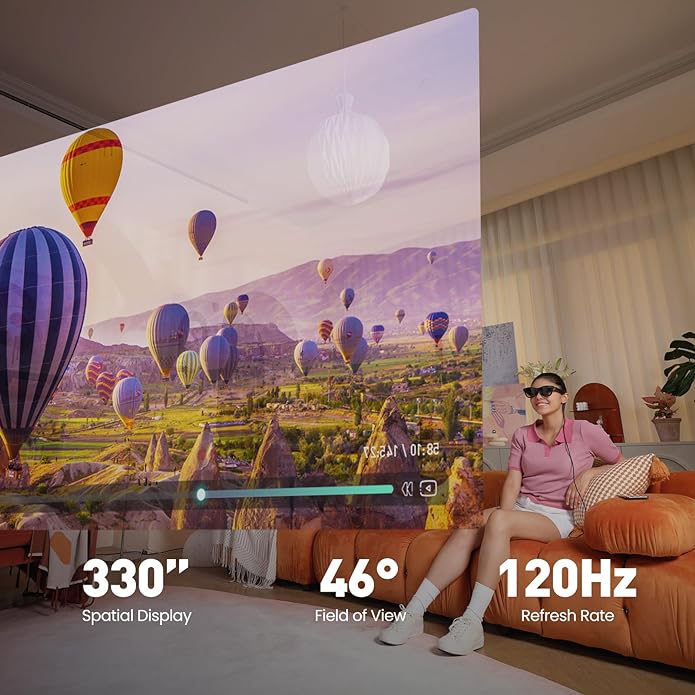
The glasses use two Sony 0.55-inch micro-OLED panels and birdbath optics to show a 1920 × 1080 image to each eye. XREAL specifies a 46-degree field of view, refresh rates up to 120 Hz in 2D mode and 90 Hz in 3D mode, and perceived brightness up to 500 nits. Those are manufacturer specifications rather than measurements made for this article.
In basic screen-mirroring use, the connected device supplies both the picture and power over USB-C. The glasses have built-in stereo speakers and two microphones. They do not contain a general-purpose battery, app store, or full mobile operating system, so there is no battery runtime to manage on the glasses themselves. The source device’s battery drains while it powers and drives the display.
This distinction matters. The Air 2 Pro has no outward-facing camera and does not perform hand tracking, plane detection, depth mapping, or six-degree-of-freedom positional tracking. XREAL’s developer documentation lists only three-degree-of-freedom rotational tracking for the Air/Air 2/Air 2 Pro family. It can respond to where the wearer turns their head when supported by compatible software or an accessory, but it cannot independently understand a room or track the wearer moving through it.
XREAL Air 2 Pro specifications at a glance
| Feature | Published specification | Why it matters |
|---|---|---|
| Display | Dual 0.55-inch Sony micro-OLED | Creates a separate image for each eye |
| Resolution | 1920 × 1080 per eye | Suitable for video, games, and readable large text when fit is correct |
| Field of view | 46 degrees | Produces a floating-screen effect rather than room-filling immersion |
| Refresh rate | Up to 120 Hz in 2D; 90 Hz in 3D | Actual modes depend on source and software |
| Brightness | Up to 500 nits perceived | Ambient light and lens dimming affect visibility |
| Dimming | Three electrochromic levels: 0%, 35%, 100% | Changes how much of the surroundings remain visible |
| Weight | 75 grams | Light for display glasses, but fit remains individual |
| Tracking | 3DoF with supported accessory/software | Tracks head rotation, not movement through a room |
The electrochromic dimming is the principal difference between the Air 2 Pro and the regular Air 2. A button changes lens transparency without attaching a separate blackout cover. Dimming can improve contrast, but it does not turn the glasses into a virtual-reality headset: the optics still present a bounded virtual display.
Compatibility: check video output first
The most important compatibility question is whether the source can output video over its port. A USB-C connector alone is not enough. For a direct one-cable connection, the device generally needs DisplayPort video output over USB-C. Many laptops, handheld PCs, and selected Android phones support this; many budget phones do not.
- USB-C computers and handhelds: compatible ports can usually mirror the screen directly. Verify the port specification, especially on desktops with front-panel USB-C.
- Android phones: support varies by model, chipset, region, and software. Consult XREAL’s current compatibility information instead of assuming every Android phone works.
- USB-C iPhones: models with compatible video output can mirror through USB-C. Older Lightning models require an appropriate conversion path and additional hardware.
- HDMI devices: consoles and other HDMI sources need a powered HDMI-to-glasses adapter or compatible XREAL accessory. A passive cable is not sufficient in many setups.
- Spatial modes: screen pinning and smooth-follow behavior require supported XREAL software or hardware such as Beam or Beam Pro; availability differs by source.
Buyers should check XREAL’s official product and support pages before purchasing an adapter because device lists and software support can change. This is also where the Air 2 Pro differs from camera-equipped devices and from conventional smart glasses. For comparison, our Ray-Ban Meta Wayfarer guide covers camera-and-audio glasses designed around capture and voice features rather than a private micro-OLED screen.
Use the official Air 2 Pro specifications as the baseline and XREAL’s current developer compatibility documentation for tracking capabilities. Retail listings sometimes combine support for the glasses, Beam accessories, Nebula software, and source devices into one feature list. Separate those layers before deciding what a particular connection can do.
Setup and first-use checklist
- Confirm that the source device supports the intended video-output mode.
- Update the source device, any XREAL accessory, and the glasses firmware through official tools.
- Choose the nose pad that centers both displays and adjust the temples so the top and bottom edges are visible.
- Start at a moderate brightness and audio level in a seated, safe location.
- Mirror a static desktop or test image and check all four corners before starting a film or game.
- If text is blurred, reposition the glasses before assuming the panels are faulty. Prescription correction may be necessary.
- Take regular breaks and stop if dizziness, eye strain, nausea, or unusual warmth occurs.
XREAL supplies a detachable prescription-lens frame. The company instructs users who need corrective lenses to have suitable lenses fitted by an optical professional or use appropriate contact lenses. The display has no user-adjustable focus, and the glasses should not be worn over another pair of glasses.
Comfort, image quality, and privacy
Fit affects the picture
XREAL lists a 75-gram weight, three-position temple adjustment, and three nose-pad sizes. These choices help, but comfort cannot be inferred from weight alone. Face shape, interpupillary distance, prescription needs, and session length can all change the experience. Edge blur or clipped corners may appear when the optical sweet spot does not align with the wearer’s eyes.
A large screen, not infinite space
Marketing often describes a cinema-size image at a simulated distance. That is a perceptual comparison, not a physical screen measurement. The 46-degree field of view is the more useful specification. It feels more like a large display suspended ahead of the user than a scene wrapping around peripheral vision.
Private-looking is not fully private
People nearby cannot see the full virtual image, but some light may be visible from certain angles, and built-in speakers can be audible in quiet spaces. The wearer also remains responsible for awareness of people, traffic, obstacles, and confidential information on the connected device. Electrochromic dimming reduces the view through the lenses, so it should not be used while walking or performing tasks that demand unobstructed vision.
Best uses and important limits
The Air 2 Pro is strongest when a portable external display is more useful than a tablet or monitor. Typical uses include watching video in a seat, playing a handheld console with a larger perceived picture, previewing a laptop display while traveling, or keeping a screen out of direct view of people behind the user.
- Good fit: seated media viewing, compatible handheld gaming, and occasional portable-monitor use.
- Conditional fit: productivity with small text, which depends heavily on fit, eyesight, resolution, and software.
- Poor fit: outdoor navigation, exercise, room-scale AR, photography, or hands-free work that requires environmental understanding.
Anyone exploring the broader category should also understand how display glasses differ from sensor-rich wearables. Our guide to smart fabrics and wearable technology explains how sensors, power, data handling, and maintenance shape real-world usefulness. The discussion of technology in fashion adds context on why comfort and social acceptability matter as much as specifications.
For productivity, test the exact applications you expect to use. Video and games tolerate minor edge softness better than spreadsheets, coding tools, or small interface text. A fixed mirrored screen may also move with the head, while an anchored or smooth-follow screen depends on supported spatial modes. These differences affect comfort more than a headline screen-size comparison suggests.
Safety and care
XREAL’s quick-start guide recommends sessions of no more than two hours, with a 10-to-15-minute break every 45 minutes. It also warns users to stop if they experience eye strain, dizziness, nausea, balance problems, visual abnormalities, or skin irritation. People with relevant medical conditions should review the manufacturer’s health guidance and consult a clinician where appropriate.
- Do not use the glasses for driving, cycling, or any activity where reduced awareness creates risk.
- Do not expose them to liquid, drops, crushing, or extreme temperatures.
- Disconnect them and allow them to cool if they become uncomfortably warm.
- Clean contact surfaces and optics with suitable non-abrasive materials.
- Use authorized or correctly specified adapters to avoid power and compatibility problems.
Who should consider the XREAL Air 2 Pro?
Consider it if you already own a confirmed-compatible source, want a wearable 1080p display, value adjustable lens dimming, and accept a cable and limited tracking. Look elsewhere if you need a standalone headset, room mapping, hand tracking, a camera, independent apps, or guaranteed all-day comfort.
Because the glasses are part of a fast-moving product line, compare current models and total setup cost rather than judging the frame in isolation. An adapter, Beam accessory, prescription lenses, or charging solution may materially change the price and complexity. A return policy is particularly valuable because optical fit is difficult to predict from specifications.
Also consider the source device’s ports while it is connected. A phone with one USB-C port may be unable to charge normally without an accessory that supports power passthrough. A handheld console may lose runtime more quickly, and a laptop connection may occupy the port needed for a dock. Planning the whole setup prevents a technically compatible product from becoming inconvenient in daily use.
Frequently asked questions
Is the XREAL Air 2 Pro a standalone AR headset?
No. It needs a compatible source device for video and power. Some spatial display modes also require supported XREAL software or an accessory.
Does it have cameras or hand tracking?
No. XREAL’s documentation says the Air 2 Pro has no camera and supports rotational tracking rather than hand tracking, plane detection, or room-scale positional tracking.
Will it work with any USB-C phone?
No. The phone must provide a compatible video signal, and advanced software features have narrower device requirements. Check the exact model against current XREAL guidance.
What makes the Pro version different?
The Air 2 Pro adds three levels of electrochromic dimming. Core display resolution and general form remain closely related to the Air 2.
Can it replace a desktop monitor?
For some short sessions, perhaps. Long-form text work depends on fit, eye comfort, software, and tolerance for a head-worn display. It is better evaluated as a portable secondary display than assumed to be a universal monitor replacement.
Bottom line
The XREAL Air 2 Pro is a compact wearable display with sharp published resolution, adjustable electrochromic dimming, built-in audio, and broad potential source-device support. Its value depends on compatibility and optical fit. It does not provide the cameras, environmental sensing, or independent computing implied by some uses of the term “AR glasses.” Check the complete connection path, accessory cost, and return terms before buying.
Leave a Reply